claude setup-token fixed my launchd auth and dropped my connectors
If you added
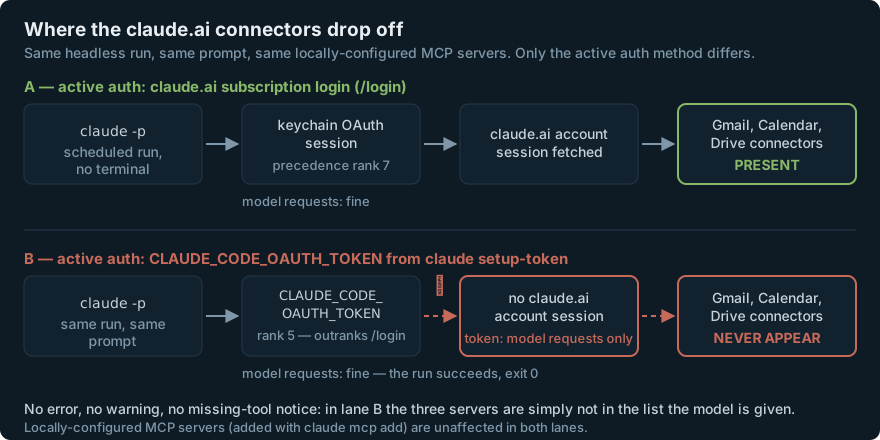
CLAUDE_CODE_OAUTH_TOKENto a scheduledclaude -pjob, your claude.ai connectors — Gmail, Google Calendar, Google Drive — are gone, and nothing told you. Asetup-token“can only make model requests”, and it sits above your/loginsession in Claude Code’s auth precedence, so setting it silently demotes the session the connectors ride on. They don’t error; they never enter the tool list. Keep the keychain session primary and make the token an explicitly-degraded fallback. Jump to the fix.
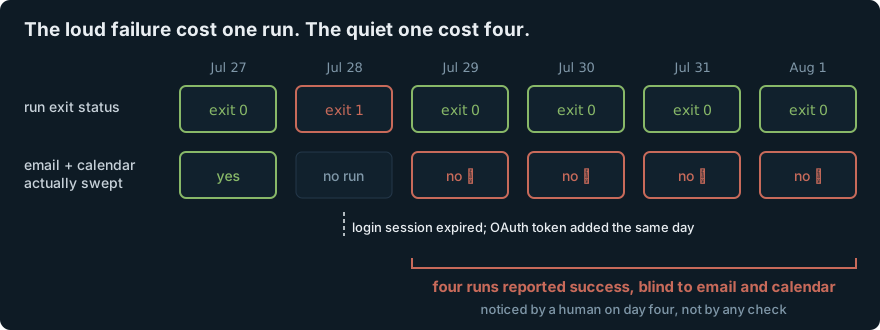
I run a daily scheduled agent job on a Mac: a launchd agent fires a headless claude -p at 06:05, the agent reads a planning repo, sweeps my email and calendar for anything due, and writes a standup file. It has been reliable for months. Then it was blind for four days and every one of those runs told me it had succeeded.
The problem: launchd, a keychain, and a fix that worked
One morning the job just didn’t produce anything. The log had the useful part:
=== daily-standup 06:05 ===
OAuth session expired and could not be refreshed
=== daily-standup FAILED (exit 1): no artifact written ===
(On current builds this surfaces as Login expired · Please run /login; the CLI documents both the warning and the expired state.)
This is the classic unattended-macOS problem. Claude Code stores subscription credentials in the encrypted login Keychain, and a job launched by launchd on a machine that woke from sleep is not the same thing as you sitting at a terminal. There is a long-running open bug where a process tree rooted at launchd reports “not logged in” against credentials that security find-generic-password can read perfectly well from the same context. Whatever the precise cause on any given day, the symptom is the same: an interactive login is not a durable credential for a background job.
Anthropic documents the answer, and it is a good one:
For CI pipelines, scripts, or other environments where interactive browser login isn’t available, generate a one-year OAuth token with
claude setup-token.
So I ran it, put the token in the env file the job already sources, and moved on:
# scheduled wrapper — the version that "fixed" it
set -a                          # the env file is bare KEY=val with no `export`,
source "$HOME/.agent/.env"      # so allexport is what makes the child inherit it
set +a

claude --print --permission-mode bypassPermissions --model "$MODEL" "$PROMPT"
That env file holds about twenty keys — analytics credentials, a couple of API keys, and now the Claude token. One line, one variable, done. The job ran green the next morning and every morning after.
Diagnosis: the run wasn’t failing, it was half-blind
Four days later I noticed the standups had stopped mentioning email. Not “failed to read email” — just nothing, as if the week had been quiet. The agent’s own summary of what it swept listed the repo and nothing else, and I’d skimmed past it four times.
The check took thirty seconds once I thought to run it:
$ claude mcp list
claude.ai Gmail              ✓ Connected
claude.ai Google Calendar    ✓ Connected
claude.ai Google Drive       ✓ Connected
signalk                      ✓ Connected

$ CLAUDE_CODE_OAUTH_TOKEN=sk-ant-oat01-… claude mcp list
signalk                      ✓ Connected
Same machine, same second, same config. The only difference is one environment variable, and three servers vanish. Not “failed”, not “needs authentication” — absent.
Why: connectors ride on the account session, and the token outranks it
Two things in the docs explain it completely, and I had read neither, because I was solving a launchd problem and this is filed under authentication and MCP.
One. A setup-token is deliberately narrow:
This token authenticates with your Claude subscription and requires a Pro, Max, Team, or Enterprise plan. It can only make model requests, so it can’t establish Remote Control sessions or fetch claude.ai connectors. MCP servers you configure locally still work.
— Authentication § Generate a long-lived token (emphasis mine)
Two. The MCP page spells out the exclusion list, and the last bullet is this exact situation:
Connectors from claude.ai are fetched only when your active authentication method is a claude.ai subscription login. They aren’t loaded, even if you previously ran
/login, when:
ANTHROPIC_API_KEY,ANTHROPIC_AUTH_TOKEN, orapiKeyHelperis active- A third-party provider such as Amazon Bedrock or Google Cloud’s Agent Platform is active
ANTHROPIC_PROFILE, the federation variables, or an active Anthropic profile supplies the credentialCLAUDE_CODE_OAUTH_TOKENholds a token fromclaude setup-token, which can only make model requests— Connect Claude Code to tools via MCP § Use MCP servers from claude.ai
The mechanism is the authentication precedence list. CLAUDE_CODE_OAUTH_TOKEN is rank 5. Your /login subscription credential is rank 7 — dead last:
| Rank | Credential | claude.ai connectors? |
|---|---|---|
| 1 | Cloud provider (Bedrock / Vertex / Foundry) | no |
| 2 | ANTHROPIC_AUTH_TOKEN |
no |
| 3 | ANTHROPIC_API_KEY |
no |
| 4 | apiKeyHelper output |
no |
| 5 | CLAUDE_CODE_OAUTH_TOKEN (setup-token) |
no |
| 6 | Anthropic profile / federation credentials | no |
| 7 | Subscription OAuth from /login |
yes |
Read as a table, the shape of the trap is obvious: connectors are available under exactly one of seven credential sources, and it’s the one anything else beats. Setting any of the six above your login costs you the connectors. setup-token is just the one you’re most likely to add on purpose, at 6am, to fix something else.
The part that actually cost four days
Getting it wrong is forgivable. Not being told is the expensive bit, and Claude Code is otherwise good about this. For a server you configured locally that needs authentication, headless runs get an explicit signal — as of v2.1.196, “Claude Code tells Claude that the server’s tools are unavailable until you authorize it,” so the model can name the server instead of answering as if it were never configured.
Connectors dropped by auth method get none of that, and structurally can’t: they were never fetched, so there is no server object to mark unavailable. The list the model receives is simply shorter. The model has no way to know, and answers confidently from what’s left.
So the run:
- exits
0 - writes its artifact
- reports success
- and is missing half its inputs
Which is a much worse failure than the crash I was fixing. The crash cost me one standup and announced itself before breakfast.
What I tried, and why each one failed
Attempt 1 — put the token in the shared env file. This is the whole bug, and its real lesson isn’t about Claude at all: source-ing a general-purpose env file into an agent runner is an authentication change, not a configuration convenience. The blast radius of set -a; source .env is every variable in that file, including the ones another tool put there. I added a key to make a scheduler happy and silently changed which account session my agent ran under.
Attempt 2 — trust the exit code. The wrapper’s health check was “did claude exit non-zero”, and every degraded morning it said yes. Exit 0 from an agent run is a claim about the process, not about the work. Worse, I also had the agent report its own coverage in the output — and it did, accurately, listing only the sources it could see. A self-report is only as good as the reader; four days of “swept: repo” scrolled by unread.
Attempt 3 — check for today’s artifact by exact filename.
ARTIFACT="reports/$(date +%F).md"
[[ -f "$ARTIFACT" && "$(stat -f %m "$ARTIFACT")" -ge "$STAMP" ]]
This looks airtight and isn’t. On the first morning of the fix, the agent inferred the wrong date and filed a perfectly good report under a filename three days in the future. The check saw no reports/2026-08-01.md, declared total failure, and fired a redundant retry over a successful run. Two fixes fell out: the heartbeat should ask “did a new artifact appear”, not “did this filename appear”, and the prompt should never let the model infer the date:
PROMPT="TODAY IS $(date +%F). Use that date for the filename and every date computation — do not infer it.

${PROMPT}"
Attempt 4 — find -newermt for “any new artifact”. The obvious one-liner:
wrote_artifact() { [[ -n "$(find reports -name '*.md' -newermt "@$STAMP" -print -quit 2>/dev/null)" ]]; }
It returned false inside the script while the same predicate, same STAMP, same directory, returned true when I ran it by hand. It fired two more redundant degraded runs before I gave up guessing and made the check say what it saw:
echo "heartbeat: STAMP=$STAMP now=$(date +%s) newest=$(ls -t reports/*.md | head -1) mtime=$(stat -f %m "$(ls -t reports/*.md | head -1)")"
The mtime was comfortably newer than STAMP. find disagreed anyway. I never did root-cause the find(1) quirk, and I’m at peace with that: two stdlib commands answer the question outright, so the correct move was to delete the clever predicate rather than debug it. A watchdog that produces false negatives is worse than no watchdog — it trains you to ignore it.
The fix
Two changes. Keychain session primary, token as an explicitly-degraded fallback, and success means “the artifact exists and is newer than this run started”:
STAMP=$(date +%s)

# Ground truth: did THIS run produce an artifact? Not the exit code, not the
# agent's self-report. `stat -f %m` is BSD/macOS; GNU coreutils is `stat -c %Y`.
wrote_artifact() {
  local newest
  newest=$(ls -t reports/*.md 2>/dev/null | head -1)
  [[ -n "$newest" && "$(stat -f %m "$newest" 2>/dev/null || echo 0)" -ge "$STAMP" ]]
}

# Primary run: the claude.ai /login session, with the token pulled OUT of the
# environment so it can't outrank it. This is the only credential that carries
# the Gmail / Calendar / Drive connectors.
OAT="${CLAUDE_CODE_OAUTH_TOKEN:-}"
unset CLAUDE_CODE_OAUTH_TOKEN
claude --print --permission-mode bypassPermissions --model "$MODEL" "$PROMPT"
rc=$?

# Fallback: an expired session must not cost a whole day's run — retry with the
# token, and say out loud that this one is degraded.
if [[ -n "$OAT" ]] && ! wrote_artifact; then
  echo "primary (keychain session) run wrote nothing, exit $rc — retrying with CLAUDE_CODE_OAUTH_TOKEN, DEGRADED: no Gmail/Calendar/Drive"
  CLAUDE_CODE_OAUTH_TOKEN="$OAT" claude --print --permission-mode bypassPermissions --model "$MODEL" "$PROMPT"
  rc=$?
fi

wrote_artifact || { echo "FAILED (exit $rc): no artifact written"; exit 1; }
The token still earns its place — it’s the difference between a degraded run and no run — it just isn’t allowed to be the default. And the one-line verification, which is what I should have run on day one:
# run this through the SAME wrapper the scheduler uses, not from your shell
claude mcp list | grep claude.ai
Why it matters, and the traps next door
The connector rule generalises past setup-token. Anything you set to make a headless run authenticate — an ANTHROPIC_API_KEY for billing separation, an apiKeyHelper pulling short-lived creds from a vault, a Bedrock switch — takes your connectors with it. The docs note the same for Anthropic profiles: “Features that need your claude.ai login, such as claude.ai connectors and /schedule, aren’t available while one of these sources is selected.” If a scheduled agent needs Gmail or Calendar, it needs the subscription login and nothing above it.
Verify under the job’s environment, not yours. Every check I ran interactively passed, because interactively the token wasn’t set. claude mcp list piped through the same wrapper the scheduler invokes is a different command than the one you type.
Anthropic’s own answer for this shape of work is routines, not cron — scheduled cloud runs that carry your connectors by default. /schedule requires a claude.ai subscription login for exactly the reason above. If your scheduled job’s whole value is the connectors, that’s the shorter path; I keep mine local because it needs the machine’s filesystem and a private repo clone.
Exit 0 is not success — name the artifact. This is the durable one, and it isn’t about Claude Code. Every unattended agent needs a success criterion expressed as a fact about the world: a file written after the run started, a row in a table, a message delivered. Process exit status tells you the interpreter didn’t crash. Ask the filesystem instead.
A degraded mode must announce itself. The fallback path prints DEGRADED: no Gmail/Calendar/Drive into a log a human eventually reads, and the agent reports its actual coverage in its output. A silent fallback is just the original bug with more steps.
Version note. The claude mcp list behaviour above is my observation on Claude Code 2.1.22x (August 2026) — the docs describe connector visibility in terms of /mcp and /status, not claude mcp list, so treat the exact output as illustrative. The underlying rule is documented and stable. Separately, there are community reports of connectors also going missing in -p mode with a perfectly good login (#36060, #43298) — a different mechanism from this one, and worth ruling out before you blame your auth.
This scheduled job files commitments for an all-electric charter catamaran that doesn’t exist yet — the agent stack around it is public at naturali-agents. The boat is the reason the “did anything actually happen” question matters more than the exit code: nobody is watching the log at 06:05.
Related: launchd’s minimal PATH breaks MCP servers: uv command not found — the same class of trap one layer down, where the scheduler’s environment silently isn’t yours; When MCP tools break, isolate the server before blaming the agent — the debugging order for missing tools; and Monitor the delivery path, not just the alarm — the dead-man’s-switch pattern this heartbeat is an instance of.