MapLibre's SDF icon edge is at 0.75, not 0.5
TL;DR — If you hand-author the alpha channel of an SDF icon for
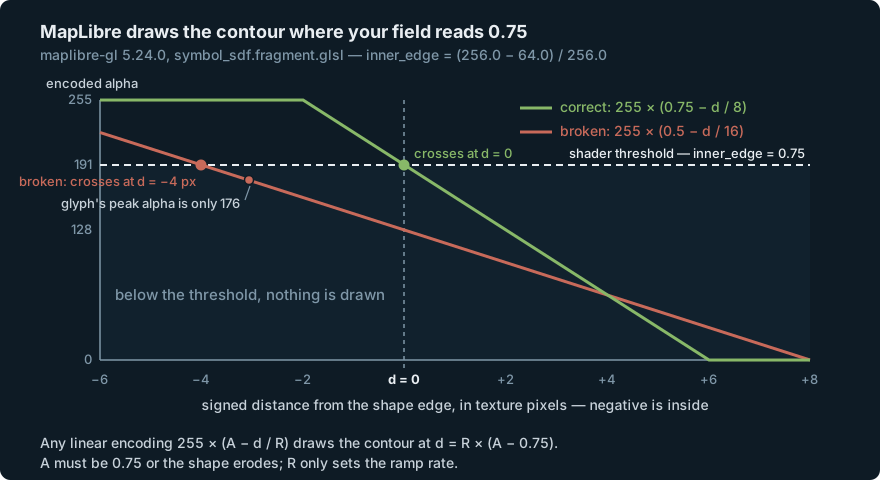
map.addImage(id, img, { sdf: true }), the edge does not go at alpha 128. MapLibre’s shader thresholds the fill atinner_edge = (256.0 - 64.0) / 256.0= 0.75, i.e. alpha 191, over an 8-texture-pixel field. Encode the edge at 128 and the shader draws a contour 4 px inside your shape — anything thinner than 8 px vanishes completely, silently, with correct geometry and no error of any kind. Usealpha = 255 * (1 - cutoff - d / SDF_PX)withcutoff = 0.25,SDF_PX = 8. Jump to the fix.
We draw station pins on a MapLibre chart in
Slackwater, an offline
tide-and-current app for the Salish Sea. The pins need to change colour with
live state — flooding, ebbing, slack — and they need a halo so they stay legible
over bathymetry contours. In MapLibre, icon-color and icon-halo-color only
do anything on SDF icons, so the pin has to be registered as a signed
distance field.
The glyphs are simple stroke geometry — a sine wave for a current station, a dome over a datum line for a tide station — so rather than rasterise a path and hope, we computed the field analytically: exact distance from each pixel to the stroke centreline, minus half the stroke width. A canvas-rasterised path gives you a 1 px coverage ramp, which is enough to tint an icon but nowhere near enough to hang a halo on.
The geometry was right. The icons rendered as nothing.
The problem: a correct icon that draws zero pixels
The registration is unremarkable, and it succeeds:
map.addImage(id, pinGlyphImage(kind), { sdf: true, pixelRatio: PIN_PIXEL_RATIO });
So is the layer:
{
  id: "station-pins",
  type: "symbol",
  source: "stations",
  layout: {
    "icon-image": ["match", ["get", "kind"], "current", "pin-current", "pin-tide"],
    "icon-size": 1,
    "icon-allow-overlap": true,
    "icon-ignore-placement": true,
  },
  paint: {
    "icon-color": ["match", ["get", "state"], "flood", "#4a9fd8", "ebb", "#e8a33d", "#7d9cb8"],
    "icon-halo-color": "#0b1a2b",
    "icon-halo-width": 1.5,
  },
}
And the field generator looked right too. signedDistance returns the exact
distance to the union of strokes, negative inside; the encoding was the obvious
one:
const SPREAD = 8;
// ...
const d = signedDistance({ x: x + 0.5, y: y + 0.5 }, strokes);
// maplibre's SDF convention: 128 is the edge, higher is inside.
const a = Math.round(255 * Math.max(0, Math.min(1, 0.5 - d / (2 * SPREAD))));
That comment is the whole bug. It is stated with total confidence and it is wrong.
There is no error. map.addImage resolves, map.hasImage(id) returns true,
the source has features, the layer is in the style, nothing appears in the
console, and WebGL is perfectly happy. You get a map with correct data on it and
no pins.
Diagnosis: read the shader
MapLibre’s icons and its text glyphs go through the same fragment shader. The
whole answer is six lines of
src/shaders/glsl/symbol_sdf.fragment.glsl
in maplibre-gl 5.24.0:
#define SDF_PX 8.0
// ...
lowp float inner_edge = (256.0 - 64.0) / 256.0;   // line 34  -> 0.75
lowp float dist = texture(u_texture, tex).a;
// ...
highp float alpha = smoothstep(inner_edge - gamma_scaled, inner_edge + gamma_scaled, dist);
dist is your alpha channel, normalised to 0–1. The shader paints the contour
where dist equals 0.75 — alpha 191 — not 0.5. (In the sibling
symbol_text_and_icon shader the same constant is spelled buff, which is the
older Mapbox name you will see quoted around the web; the value is identical.)
Now the arithmetic. Take any linear encoding of the form
alpha = 255 * (A - d / R), where A is the value you put at d = 0 and R
is the distance over which the field ramps. The shader draws the contour where
A - d / R = 0.75, that is:
d = R * (A - 0.75)
That single line explains everything:
| encoding | A | R | contour the shader draws |
|---|---|---|---|
| ours (broken) | 0.5 | 16 | d = -4 px — 4 px inside the true edge |
| edge at 0.5, correct ramp | 0.5 | 8 | d = -2 px — 2 px inside |
| correct | 0.75 | 8 | d = 0 — the true edge |
A has to be 0.75 or the shader renders an eroded version of your shape. R
does not affect where the edge lands at all — it only sets the ramp rate, which
is what halo widths and antialiasing are scaled against.
Our strokes are 0.14 * 44 = 6.16 texture pixels wide, so the deepest interior
point sits at d = -3.07. A 4 px erosion of a 6.16 px stroke leaves nothing:
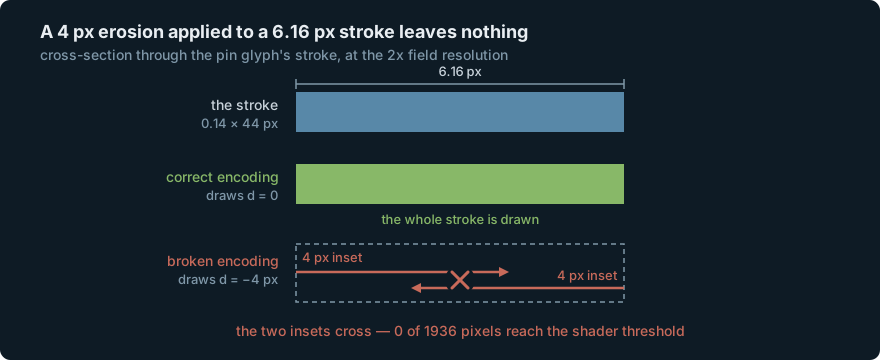
Run the numbers over the actual field and the result is exact: peak alpha 176,
threshold 191.25, 0 of 1936 pixels above it. The antialiasing band does not
save you either — EDGE_GAMMA = 0.105 / u_device_pixel_ratio puts the
smoothstep’s lower edge around alpha 178 at devicePixelRatio 2, still above the
field’s maximum.
Why 0.75 is not an arbitrary number
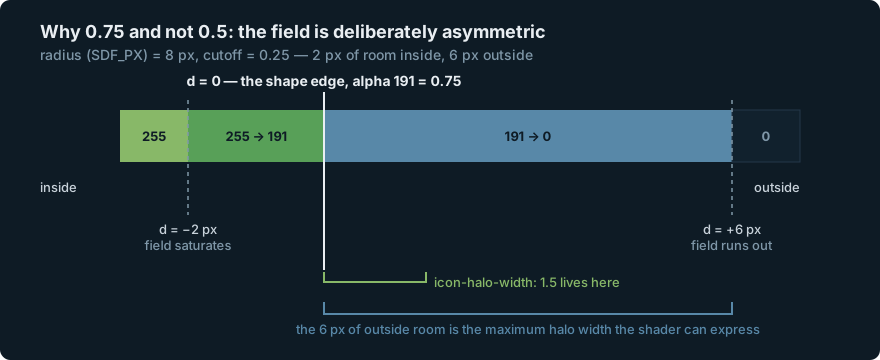
The intuition that says “0.5” is really the intuition that the field should be symmetric around the edge. MapLibre’s is deliberately asymmetric, and the reason is halos.
The encoding comes from
@mapbox/tiny-sdf,
whose defaults are radius = 8, cutoff = 0.25:
const scale = 255 / this.radius;
const base = 255 * (1 - this.cutoff);
for (let i = 0; i < len; i++) {
    const d = Math.sqrt(gridOuter[i]) - Math.sqrt(gridInner[i]);
    data[i] = Math.round(base - scale * d);
}
which is alpha = 255 * (1 - cutoff - d / radius). With cutoff = 0.25 and
radius = 8 the field saturates 2 px inside the shape and runs out 6 px
outside. The edge therefore sits 6 / 8 = 0.75 of the way up the range — and
that is the same 0.75, arrived at from the other direction. MapLibre uses
exactly these constants for its own glyph atlas, in
glyph_manager.ts
(radius: 8 * textureScale, cutoff: 0.25).
The 6 px is not a coincidence either. It reappears in the halo branch of the same shader:
highp float halo_edge = (6.0 - halo_width / fontScale) / SDF_PX; // line 53
Six pixels of outside room is precisely the widest halo the shader can express. That is what the asymmetry buys.
What we tried (and why it failed)
The test that asserted the bug
The glyph generator shipped with a unit test written specifically to pin down the alpha encoding. It passed:
it("puts the shape edge at alpha 128 — inside is brighter, far outside is dark", () => {
  const img = pinGlyphImage("tide");
  const mid = Math.floor(img.width / 2);
  expect(alphaAt(img, 0, 0)).toBeLessThan(128);
  const column = [];
  for (let y = 0; y < img.height; y++) column.push(alphaAt(img, mid, y));
  expect(Math.max(...column)).toBeGreaterThan(128);
});
Corner alpha is 0, which is less than 128. Peak column alpha is 176, which is greater than 128. Green, on a glyph that renders zero pixels.
The test asserted the same wrong constant the implementation did, so it could
only ever confirm the code agreed with itself. toBeGreaterThan(128) is
satisfied by 176 — the value that proves the bug — and by 255. The assertion had
no power exactly where it mattered.
“Just tighten the spread until something appears”
The tempting empirical fix, once you know the icons are invisible but not why, is to make the field steeper and see what shows up. It does eventually produce marks, which is the trap:
ramp span R |
contour drawn | what you see | outside room left |
|---|---|---|---|
| 16 | d = -4.00 px |
nothing | 8 px |
| 12 | d = -3.00 px |
a 0.16 px thread | 6 px |
| 10 | d = -2.50 px |
a 1.16 px hairline | 5 px |
| 8 | d = -2.00 px |
2.16 px of a 6.16 px stroke | 4 px |
At R = 8 with the edge still at 0.5 you get something that looks plausible on
screen — a thin version of the glyph — and you ship a shape that is 2 px
narrower everywhere than the one you drew, with a field that runs out 4 px
outside instead of 6, so icon-halo-width values above 4 quietly clip. Tuning
by eye lands you here.
“Add a constant so the edge reads 192”
Also close, also wrong:
// edge lands at 192 — but the ramp rate is still 1/16 per px
const a = Math.round(255 * (0.5 - d / 16)) + 64;
The contour now falls at d = 0, so the shape is the right size. But the ramp
is half as steep as SDF_PX = 8 assumes, so every halo width comes out at the
wrong scale, and the far field bottoms out at a floor of 64 instead of 0 — the
alpha channel never reaching zero on an image you also might want to reuse
non-SDF. Two knobs, and this only turns one of them.
The fix
Encode the edge at the threshold the shader actually uses, and ramp at the rate it actually assumes:
/**
 * maplibre's SDF constants, not ours to choose: the shader thresholds the icon
 * fill at `inner_edge = (256 - 64) / 256 = 0.75` over a field authored with
 * `SDF_PX = 8` texture pixels. Matches `@mapbox/tiny-sdf`'s `cutoff = 0.25`.
 */
const SDF_PX = 8;
const SDF_CUTOFF = 0.25;

const d = signedDistance({ x: x + 0.5, y: y + 0.5 }, strokes);
// 255 * (1 - cutoff - d/SDF_PX): edge (d=0) lands at ~191, the interior
// saturates to 255, and the field reaches 0 at 6px outside the stroke.
const a = Math.round(255 * Math.max(0, Math.min(1, 1 - SDF_CUTOFF - d / SDF_PX)));
One line, and it is just tiny-sdf’s own formula. The edge lands at 191, the interior saturates at 255, the field runs out 6 px outside.
The test gets the real invariant — saturation, not “brighter than the value we assumed”:
it("puts the shape edge at maplibre's 0.75 threshold, and saturates inside", () => {
  const img = pinGlyphImage("tide");
  const mid = Math.floor(img.width / 2);
  expect(alphaAt(img, 0, 0)).toBe(0);
  const column = [];
  for (let y = 0; y < img.height; y++) column.push(alphaAt(img, mid, y));
  expect(Math.max(...column)).toBe(255);
  expect(column.some((a) => a > 180 && a < 205)).toBe(true); // the edge band
});
toBe(255) is the assertion that has teeth. An interior that never reaches 255
is an interior that may never cross 0.75, and that is the failure this whole
post is about.
Why it matters, and the traps next door
The failure mode is silence. There is no error string to search for, which is why this costs hours rather than minutes — you go looking for a bug in your geometry, your projection, your GeoJSON, your collision settings. The symptom is an absence.
It is worse than silent, actually. Our pins carry
"icon-halo-color": "#0b1a2b" — the same value as the map’s background. The
halo branch thresholds at halo_edge = (6.0 - halo_width / fontScale) / SDF_PX,
which for any non-zero halo width is below the 0.75 fill threshold. So a
field that is too dark to draw a fill can still be bright enough to draw a halo.
With a halo colour that matches the water, the glyph paints itself in the
background tone. Worth knowing before you conclude “nothing rendered.”
The docs do not tell you. MapLibre’s
StyleImageMetadata
documents the sdf flag in full as: “Whether the image should be interpreted
as an SDF image.” That is the entire specification of the alpha format.
mapbox/mapbox-gl-style-spec#97
— “Style reference: document sdf icons” — was opened in 2014 and never resolved;
maplibre/maplibre-native#2551
asks for the same thing and is still open. The one human-readable statement of
the number I could find anywhere is a paragraph on a Mapbox
troubleshooting page about recolorable images:
“values between 192 and 255 represent ‘inside’ a glyph and values from 0 to 191
represent ‘outside’.” Correct, and filed under glyphs, and never connected to
addImage.
The scale-invariant part is the part you must get right. A = 0.75 is fixed
— it is a threshold on a normalised alpha, so it holds whatever resolution you
author at. R scales with your image: we author at pixelRatio: 2 with
R = 8, while MapLibre’s own glyph atlas uses radius: 8 * textureScale.
Getting A wrong makes your icon vanish; getting R wrong makes your halo
widths come out at the wrong scale. Check the halo by eye, but check the edge by
arithmetic.
And the general one. A test that asserts a constant the implementation also asserts is not a test, it is a restatement. The useful assertion was not “is the edge where we think” — it was “does the interior saturate,” a property with a single correct answer that does not depend on the belief being tested.
Slackwater is the offline tide and current app for the Salish Sea we run
alongside the boat’s software stack — the sort of thing you want working at
anchor with no signal. Code:
slackwater-web,
src/pinGlyphs.ts.
Related: porting a tide engine to Swift with the original as the test oracle — the other half of getting numeric code to tell you when it is wrong, and offline tidal current predictions from harmonic constituents — what the pins in this post are actually showing.