SignalK's two token classes: why plugin routes 401 your device token
TL;DR — SignalK server has two token classes with different powers. A device token (Security → Access Requests) can write data — deltas, PUTs — but gets
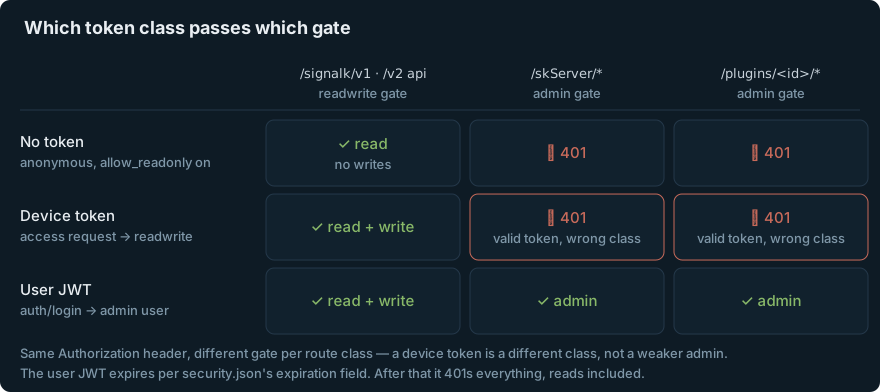
401 Permission Deniedon every/plugins/<id>/*and/skServer/*route, because those are admin-gated and a device token isreadwrite, notadmin. Plugin REST APIs need a user JWT fromPOST /signalk/v1/auth/login— and that JWT silently expires per theexpirationfield insecurity.json(the field the admin UI calls “Remember Me timeout”; the code falls back to1h). Jump to the fix.
Our agent writes log entries through the signalk-logbook plugin’s REST API. One day we went looking for a specific entry and found the log had a week-long hole in it. No crash, no alert, nothing in the dashboards — every read of the system looked perfectly healthy. The writes had been dying with a 401 the entire time, and the client’s fire-and-forget POST swallowed every one.
The 401 turned out to be two different auth problems stacked on top of each other, and both come from the same under-documented fact: a SignalK server’s auth surface differs per route class, and the two kinds of token it mints are not interchangeable.
Problem
The setup is ordinary: a SignalK server in Docker with security enabled and allow_readonly on, and an automation client that reads vessel data anonymously and writes log entries with a bearer token.
Reads: fine, no token needed —
$ curl -s http://localhost:3000/signalk/v1/api/vessels/self/navigation/position
{"meta":{...},"value":{"longitude":...,"latitude":...},...}
Writes to the plugin’s REST API with the token we had: not fine —
$ curl -s -X POST -H "Authorization: Bearer $TOKEN" \
    -H 'Content-Type: application/json' \
    -d '{"text":"Test entry"}' \
    http://localhost:3000/plugins/signalk-logbook/logs
You do not have permission to view this resource, <a href='/admin/#/login'>Please Login</a>
With an Accept: application/json header the same rejection comes back as:
{"error":"Permission Denied"}
And because the client treated the POST as fire-and-forget, that response went nowhere. The read path being anonymous is exactly what made this invisible: everything you’d casually check — positions, dashboards, the admin UI — kept working, because none of it exercises the write path or the token.
Diagnosis: two token classes
SignalK mints two different kinds of bearer token, and they pass different gates.
Device tokens come from the access-request flow (spec): the client POSTs to /signalk/v1/access/requests, the admin approves it under Security → Access Requests and picks a permission level. The JWT carries a device claim, and the principal it resolves to has the granted permission — typically readwrite.
User JWTs come from logging in as a user account:
$ curl -s -X POST -H 'Content-Type: application/json' \
    -d '{"username":"agent","password":"..."}' \
    http://localhost:3000/signalk/v1/auth/login
{"timeToLive":3600,"token":"eyJhbGciOiJIUzI1NiIs..."}
The JWT carries an id claim, and the principal resolves to the user’s type — which can be admin.
Why it matters: in src/tokensecurity.ts, ordinary data writes only require readwrite:
// writeAuthenticationMiddleware — deltas, PUTs
if (
  skReq.skPrincipal?.permissions === 'admin' ||
  skReq.skPrincipal?.permissions === 'readwrite'
) {
  return next()
}
…but every plugin route and a list of server routes are mounted behind the admin middleware:
;[
  '/restart', '/runDiscovery', '/plugins', '/appstore', '/security',
  '/settings', '/backup', '/restore', '/providers', '/vessel', '/serialports'
].forEach((p) =>
  app.use(`${SERVERROUTESPREFIX}${p}`, adminAuthenticationMiddleware(false))
)

app.use('/plugins', adminAuthenticationMiddleware(false))
SERVERROUTESPREFIX is /skServer, and anything a plugin registers with registerWithRouter is mounted under /plugins/<plugin.id> — so the entire REST API of every plugin sits behind that last line. adminAuthenticationMiddleware accepts exactly one permission:
function hasAdminAccess(req: Request): boolean {
  return (
    skReq.skIsAuthenticated === true &&
    skReq.skPrincipal !== undefined &&
    skReq.skPrincipal.permissions === 'admin'
  )
}
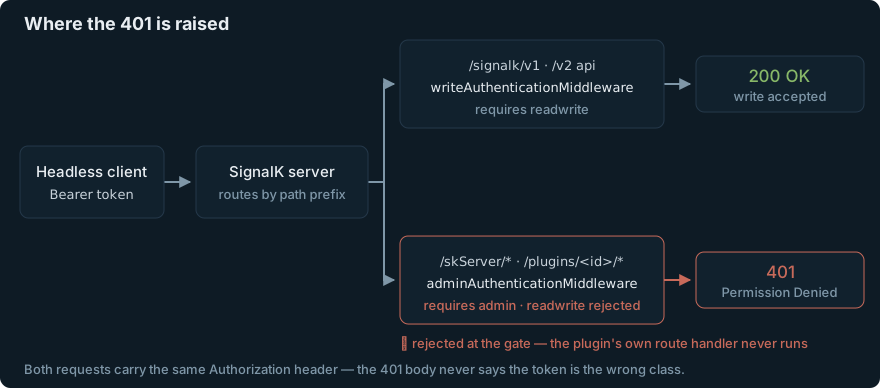
So a readwrite device token is simultaneously good enough to write vessel data and permanently insufficient for any plugin’s HTTP API. Same server, same Authorization header, different gate per route class. (You can approve a device as Admin in current server versions, but the UI defaults to Read Only and the natural choice for a data-writing device is Read/Write — which is how you end up here.)
What we tried (and why it failed)
Attempt 1 — re-mint the device token. First theory: the token expired. New access request, approved with permission Read/Write and Token Expiry NEVER. Data writes confirmed working — a course-API PUT (gated on readwrite, like deltas) goes through fine:
$ curl -s -X PUT -H "Authorization: Bearer $DEVICE_TOKEN" \
    -H 'Content-Type: application/json' \
    -d '{"position": {"latitude": 48.86, "longitude": -123.35}}' \
    http://localhost:3000/signalk/v2/api/vessels/self/navigation/course/destination
{"state":"COMPLETED","statusCode":200,"message":"OK"}
…and the plugin route still 401s:
$ curl -s -o /dev/null -w '%{http_code}\n' -X POST \
    -H "Authorization: Bearer $DEVICE_TOKEN" \
    http://localhost:3000/plugins/signalk-logbook/logs
401
This is the maximally confusing state: the token demonstrably works — for writes, even — so it never occurs to you that the token is the wrong kind. It’s not expired, not malformed, not missing a scope you can see anywhere. It just can’t pass the admin gate, and nothing in the 401 body says so.
Attempt 2 — user JWT. Worked… for a while. Once we read the routing code above, the fix seemed obvious: create a user account, log in, use that JWT:
$ curl -s -X POST -H 'Content-Type: application/json' \
    -d '{"username":"agent","password":"..."}' \
    http://localhost:3000/signalk/v1/auth/login | jq -r .token
eyJhbGciOiJIUzI1NiIs...

$ curl -s -o /dev/null -w '%{http_code}\n' -X POST \
    -H "Authorization: Bearer $USER_JWT" ... \
    http://localhost:3000/plugins/signalk-logbook/logs
200
Victory. Then, days later, the writes went dark again — this time with a different string in the log:
$ curl -s -H "Authorization: Bearer $USER_JWT" \
    http://localhost:3000/plugins/signalk-logbook/logs
bad auth token
The clue was in the login response the whole time: "timeToLive": 3600. User JWTs expire according to the server-side expiration field in security.json; the code falls back to 1h when it’s unset, and whatever short value your install carries, your freshly minted “fix” dies with it:
// login() — src/tokensecurity.ts
const theExpiration = configuration.expiration || '1h'
if (!isNever(theExpiration)) {
  jwtOptions.expiresIn = theExpiration as StringValue
}
Device tokens let you pick “NEVER” at approval time, right in the UI. User JWTs give you no such prompt — the TTL is a server-wide setting, and in the admin UI it hides under Security → Settings → “Remember Me timeout” (“How long server keeps you logged when Remember Me is checked in login”). Nothing tells you that same field is the lifespan of every token POST /signalk/v1/auth/login mints for your headless clients.
And note it’s now worse than having no token: allow_readonly only applies when no token is sent. An expired token on the request 401s even plain reads:
// Token was provided but is invalid/revoked — always reject.
// allow_readonly only applies when no token is provided at all.
res.status(401).send('bad auth token')
The fix
Two parts: a long-lived user JWT, and a re-mint procedure for when it eventually dies anyway.
1. Set the server-side expiration, then mint. Either edit expiration in security.json and restart the server (~/.signalk/security.json; in Docker that’s inside the container’s home volume) —
{
  "expiration": "365d",
  ...
}
$ docker restart signalk
$ curl -s -X POST -H 'Content-Type: application/json' \
    -d '{"username":"agent","password":"..."}' \
    http://localhost:3000/signalk/v1/auth/login
{"timeToLive":31536000,"token":"eyJ..."}
— or skip the login endpoint entirely and mint a token offline with the bundled utility, which signs against security.json’s secretKey with whatever TTL you ask for:
$ signalk-generate-token -u agent -e 1y -s ~/.signalk/security.json
eyJhbGciOiJIUzI1NiIs...
The same “Remember Me timeout” field in Security → Settings edits the value from the UI if you’d rather not touch the file — just know that’s the knob you’re turning.
2. Store the login creds next to the token, not just the token. The token will expire — a year out, or the day someone rotates secretKey. Keep SIGNALK_USER / SIGNALK_PASSWORD in the client’s env alongside the JWT, so re-minting is one curl and not an archaeology dig. Better: have the client check timeToLive at mint time and log the expiry date somewhere a human will see it.
3. Make the write path prove itself. The actual root cause was never the token — it was a write path that could fail forever without anyone noticing, twice. Fire-and-forget writes to an authed endpoint need, at minimum, surfacing of non-2xx responses; ideally an end-to-end check that reads back something it recently wrote. A healthy-looking read path tells you nothing about the write path when reads are anonymous and writes are authenticated — they don’t even share an auth gate to fail together.
Why it matters / gotchas
-
“The token works” is not “the token works here.” One server, two token classes, three permission levels, and per-route-class gates. Data writes check
readwrite;/plugins/*and/skServer/*checkadmin. When you hit a 401 with a token that provably works elsewhere, ask which middleware is in front of this route class before re-minting anything. -
The expiration knob is disguised.
security.json’sexpirationgoverns every user JWT the login endpoint mints, but the admin UI labels it “Remember Me timeout” and describes it purely in browser-login terms. If your headless client’s JWT keeps dying, this is the field. -
An expired token is worse than none.
allow_readonlygrants anonymous tokenless requests a readonly principal — but a request carrying an expired or bad token is always rejected, reads included (bad auth token). A client that “falls back to readonly” by keeping its stale header set doesn’t fall back at all. -
Pending access requests don’t survive a restart. They’re held in an in-memory map on the server (
requestResponse.ts), so if you restart between a device requesting access and the admin approving it, the request is simply gone — the device has to ask again. Approved devices are persisted tosecurity.json. -
The browser gets token refresh; your client doesn’t. Past a JWT’s half-life the server issues a refreshed token — as a session cookie. A headless client holding the raw bearer token from the login response never sees it, so browsers stay logged in indefinitely while your agent’s identical token quietly ages out.
If you’re the one writing the plugin
The same admin gate bites from the other side. A plugin that serves its data with registerWithRouter puts that data behind /plugins/<id>/* — admin-only, invisible to every anonymous or readwrite consumer, even with allow_readonly on. If what you’re serving is data rather than admin actions, register a resource provider instead:
app.registerResourceProvider({
  type: 'myThings',
  methods: {
    listResources: (query) => { ... },
    getResource: (id) => { ... },
    setResource: (id, value) => { ... },
    deleteResource: (id) => { ... },
  },
})
That serves under /signalk/v2/api/resources/myThings — reads are open under allow_readonly, writes go through the normal readwrite check, and no consumer ever needs an admin credential to look at your data. Save registerWithRouter for genuinely admin-ish endpoints, or for plugins (like a logbook) whose API is deliberately write-capable and authed — and document which token class callers need, because the server’s 401 won’t.
Close
This all fell out of running an AI crew-agent that keeps the ship’s log on an all-electric charter catamaran — the agent read the vessel state fine for a week while its log entries bounced off a gate nobody knew existed. The MCP server that now holds the long-lived JWT (and the re-mint procedure) is open source: github.com/sailingnaturali/logbook-mcp.
Related: Monitor the delivery path, not just the alarm — the same silent-401 failure shape, on the outbound notification leg · Adopt vs build: the ship’s log — how the logbook stack this bit is put together.